


GoTalk Everywhere
0.00.00 Reviews
App Specs
- Version
- 1.0.129
- Updated On
- License
- Free
- Downloads
- 10,000+
- Developer
- Attainment Company, Inc.
- Categories
- Medical
- Platform
- Android
Screenshots
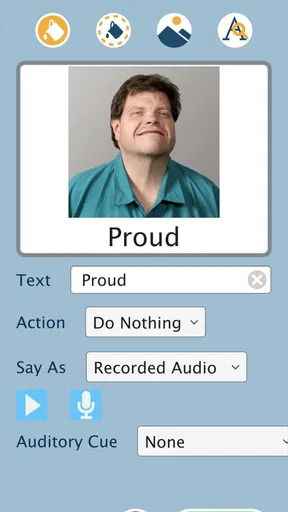

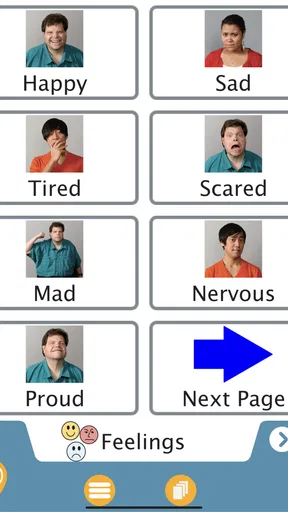
 Analysis by AppCompare
I approach GoTalk Everywhere with a different question from the one I’d ask about a typical social or messaging app: what happens to communication when the network is part of the experience? This is an AAC app from Attainment Company, Inc., in the medical category. Its purpose is to support communication, so reliable access matters more here than a long list of everyday chat features. The app is free to download, rated for Everyone, and has a current version of 1.0.94. It has 10K+ installs, while its average rating is 0.0, so there isn’t a useful rating history to lean on when deciding whether it suits you.
When connection becomes part of communication
The word “Everywhere” makes connectivity an important part of how I’d think about using this app, but it isn’t a promise that every function works without a network. I would plan around the connection available at the time rather than assume the app can provide the same experience in every setting. That distinction matters when a person relies on AAC to communicate a need, make a choice, or take part in a conversation.
For a family member or support person, a useful first step is to explore the app together in a calm setting and identify the communication routines that matter most. Then consider how those routines fit the places the person actually visits. A familiar setting with dependable connectivity may be a good place to begin; a busy location with patchy service calls for more preparation. I wouldn’t make a connection-dependent tool the only plan for an essential conversation until the person and their support team understand how it behaves in their usual environments.
Using it across the day
AAC is personal, so the best test isn’t whether an app looks polished in a quick demo. It’s whether the person who will use it can reach the communication they need without extra stress. A practical trial might include a quiet conversation at home, a short trip outside, and a familiar interaction with someone who understands the person’s communication style. Those situations reveal different pressures: time, noise, attention, and the quality of the available connection.
For example, imagine a caregiver and AAC user arriving at a clinic. Before an appointment, they can check the connection and make sure the app is ready, then give the person time to communicate questions or preferences during the visit. The caregiver should avoid taking over simply because the environment is rushed. The point is to make room for the user’s own choices, while keeping a familiar backup communication method available in case the phone or connection becomes a problem.
This kind of routine is also helpful in less formal settings, such as visiting relatives or going to a familiar café. I’d start with one or two predictable situations rather than expecting a person to adapt to every setting at once. A support person can notice which parts of the routine feel comfortable and where extra time or a different communication approach would help. That is more useful than judging the app from a single short session.
What to do when access is interrupted
Any app used for communication deserves a simple recovery plan. Before relying on it during an outing, make sure the device has enough charge, know how to reopen the app, and agree on what the person and their supporters will do if access is interrupted. A printed choice board, familiar gestures, writing, or another established AAC method can serve as a backup, depending on what works for that person. These are sensible preparations, not a claim that the app itself provides them.
Worth Reading Before You Choose

Flipboard Shows What News Apps Must Do Beyond the Feed

Switching to Android Auto Means Rethinking Your Driving Routine

Google Calendar Makes a Crowded Week Easier to Manage

Ludo King Makes the Most of the Minutes Between Plans

Baby Panda World Brings Quick Play to Modern Phones, but Its Game Library Feels Busy

ESPN’s Live Game View Makes Following Close Games Easier
It’s also worth trying a low-pressure check before an important appointment or trip: open the app where you expect to use it, confirm that the person can reach the communication they need, and leave time to address a problem. If something doesn’t work, pause and use the backup instead of repeatedly tapping through screens while the person waits. That small change in approach can reduce pressure and keep the person involved in the interaction.
Choosing a sensible data routine
Because connectivity can affect the experience, I’d be thoughtful about mobile data. If you have access to Wi-Fi, use it when convenient, especially while getting familiar with the app. For use away from home, check your device’s data settings and consider whether the plan is suitable for the person’s routine. I wouldn’t assume that a particular activity uses a particular amount of data; the sensible approach is to observe your own use and adjust the device settings if needed.
There’s a human side to this, too. Constantly asking an AAC user to wait while someone checks a signal or worries about data can make communication feel like a burden. A practical plan should balance connectivity with the person’s need to communicate freely. If a location regularly has poor service, consider whether another established communication method is a better fit there, rather than expecting the user to work around a network problem every time.
Who is most likely to benefit
I’d consider GoTalk Everywhere for an AAC user and support team who want to explore a communication app designed for use in different places, and who can take time to learn how it fits their routine. The app may be especially worth evaluating when the person’s communication needs are shared across home, school, care, or community settings. The best fit depends on the user’s access needs, preferences, and the support available—not simply on whether a phone is already part of their day.
It may not be the right choice for someone who needs a fully dependable communication method in places where connectivity is inconsistent, unless they have a suitable backup. It may also be a poor fit if the person’s preferred AAC approach is already working well and a new app would add unnecessary learning or disruption. In AAC, switching tools has a real cost: vocabulary, access, and familiar routines matter. I’d compare those needs carefully before replacing anything the person already uses successfully.
Compared with a basic communication aid or a paper-based board, an app can be easier to carry and may suit people who are comfortable using a phone or tablet. A dedicated AAC system or another established tool may be preferable when a person needs a particular access method, a carefully tailored vocabulary, or a communication routine that must remain dependable in challenging environments. I’d treat this app as one option to assess with the user and their support team, not as a universal replacement for other AAC approaches.
Putting the app into a real routine
I’d use this section to think beyond the first download and consider how GoTalk Everywhere would fit into a person’s established communication habits. A useful starting point is to choose one familiar daily situation, involve the AAC user in deciding what feels comfortable, and make sure supporters know how to respond without rushing. That routine also gives you a practical basis for judging whether the app belongs in more settings.
Easy Peasy Setup
Setting it up was a breeze. I downloaded it from the app store, popped in my phone number, and bam! I was ready to go. The interface is super intuitive, so you won’t need a degree in rocket science to figure it out. Everything is laid out in a way that just makes sense. You’ve got your chats, calls, and contacts all organized neatly, making navigation a piece of cake.
Communication Made Simple
So, what’s the deal with messaging? Well, the app supports text, voice notes, and even media sharing. I particularly love how it handles group chats. You can create custom groups for different circles—be it family, work, or your weekend hiking buddies. Plus, the app’s notification system is spot on. You’ll never miss a beat because it keeps you updated without being annoying.
Crystal Clear Calls
When it comes to calls, both voice and video options are available. I tested them out, and honestly, the call quality was impressive. Even on a not-so-great Wi-Fi connection, everything was smooth sailing. It’s like having a face-to-face conversation, minus the awkward buffering or lag.
Security You Can Trust
Now, onto something we all care about—security. GoTalk Everywhere takes your privacy seriously. All communications are encrypted, ensuring that your chats and calls are for your eyes (and ears) only. It’s comforting to know that your personal info isn’t floating around in cyberspace.
Customizable and User-Friendly
Another cool feature is the app’s customization options. You can tweak the chat themes, set custom notifications, and even choose different ringtones for different contacts. It’s these little touches that make the app feel personal and tailored to your preferences.
Why It Stands Out
So, why should you consider downloading GoTalk Everywhere? It’s simple: it consolidates all your communication needs into one seamless experience. No more juggling between apps or missing out on important messages. It’s like having a Swiss Army knife of communication tools right there in your pocket.
And if you’re worried about data usage, the app is optimized to be efficient, ensuring your data plan doesn’t take a hit. It’s these little details that make a big difference in the long run.
In conclusion, if you’re looking for a reliable, easy-to-use communication tool that won’t let you down, GoTalk Everywhere is worth checking out. It’s not just another app; it’s a game-changer in the way we connect with the world. So go ahead, give it a try, and see for yourself how it can make your life a whole lot simpler.
Price, age rating, and a careful trial
The app is free to download, with in-app purchases listed at $49.99 per item. I’d check the purchase details in the app before committing, especially if a family member or support organization is handling the device. It is rated Everyone, but that age label doesn’t tell you whether its communication approach is appropriate for a particular AAC user; that decision should come from the person’s needs and preferences.
Its release date is Jul 20, 2023, and it requires Android 6.0 or later. Those details can help when checking an older device, but compatibility alone isn’t the same as a good fit. I’d test it on the device the person expects to carry and use, with the people they communicate with most often. A short, supported trial can show whether the app’s setup and connectivity expectations work in real life.
My connectivity verdict
My main advice is to evaluate this as a communication tool, not just another app to install and forget. The promise of using it across settings is most useful when the user’s device, network access, and support routine are all considered together. Test the situations that matter, keep a backup method ready, and let the AAC user guide decisions about what feels comfortable.
For someone who wants to explore an AAC option and has the time and support to check how it performs in everyday locations, it may be worth trying. For anyone who needs communication to remain dependable where network access is uncertain, I’d be cautious about relying on it alone. That’s the clearest trade-off: connectivity can make a mobile communication routine possible, but it also deserves practical planning rather than wishful thinking.
Pros
- User-friendly interface for easy navigation.
- Supports multiple languages seamlessly.
- High-quality audio calls with minimal lag.
- Low data consumption during calls.
- Secure end-to-end encryption ensures privacy.
Cons
- Occasional connectivity issues in rural areas.
- Limited features in the free version.
- Requires a stable internet connection.
- No support for video calls currently.
- In-app purchases can be pricey.
FAQs for GoTalk Everywhere
What is GoTalk Everywhere and what are its main features?
GoTalk Everywhere is a communication app designed to facilitate seamless conversation across the globe. Its key features include high-quality voice calls, instant messaging, multimedia sharing, and real-time language translation. The app also offers group chat functionalities and allows users to create custom profiles, making it an excellent choice for both personal and professional communication.
Is GoTalk Everywhere free to use, or are there any in-app purchases?
GoTalk Everywhere is free to download and use for basic features like messaging and voice calls. However, it offers in-app purchases for premium features, such as enhanced translation services, ad-free experience, and additional customization options. Users can choose to subscribe monthly or annually to unlock these advanced features.
How secure is my data on GoTalk Everywhere?
GoTalk Everywhere prioritizes user privacy and employs end-to-end encryption for all communications. This ensures that your messages, calls, and shared media are secure and accessible only to intended recipients. The app complies with international data protection standards, providing a safe environment for users to communicate.
Can I use GoTalk Everywhere on multiple devices simultaneously?
Yes, GoTalk Everywhere supports multi-device synchronization, allowing users to access their accounts on various devices simultaneously. Whether using a smartphone, tablet, or computer, your conversations and contacts will be consistently updated, ensuring seamless communication across all platforms.
Are there any limitations on international calls with GoTalk Everywhere?
GoTalk Everywhere offers extensive international calling capabilities without additional charges for users with premium subscriptions. For free users, certain limitations may apply in terms of call duration and the number of calls per day. It's advisable to check the app's terms of service for detailed information on international calling policies.


